One of your colleagues recently asked:
This week’s question is: Do you have a checklist on what we should include in every social media post? For example, I notice some people use hashtags. Are there other things we should be using?
What a great question! I love a good checklist – and you can bet that I have one for my social posts.
I know that creating posts for social media can feel daunting. That’s why I’m going to share my 8-point checklist for creating the perfect social media post.
My 8-Point Social Media Post Checklist
1. Plan Ahead
Fail to plan, plan to fail – that’s my motto! Before you do anything else, sit down and get all of your ideas out of your head and onto paper or in a digital organizer (Trello, Asana, ClickUp, etc. are all great options for digital organization).
If you aren’t planning your social content ahead of time, it will be difficult to be consistent with content creation.
How far ahead should you plan?
That depends on your personal preference. I like to be at least a month ahead. Being ahead has lots of perks, with one of the most important ones being: that you’re able to stay consistent.
But that doesn’t mean you shouldn’t post on the fly when things or events come up. If something pops up last minute, you can shift your posts around to make room.
When it comes to brainstorming content ideas, I DO schedule time on my calendar to brainstorm. Outside of my scheduled time, I always capture content ideas as they come to me.
I recommend that you get into the habit of jotting down your ideas (on your phone or in a journal) whenever inspiration strikes.
2. Have a Hook
What do people do on social media? They scroll. You want your posts to make people stop scrolling and pay attention.
How do you do that?
Have a hook for each post.
Let’s say that you want to share the story of when you started your firm.
You could say:
- “When I started my firm, I was at ground zero.…..”
OR you could say:
- When I started my firm, I had $500 dollars in the bank, two maxed-out credit cards, and rent due in 3 days
Which of these lines hooks you? I know that I’d be more interested in reading the second story.
Tip: Don’t overexaggerate or twist the truth. Just find a way to make your story more enticing.
Bonus Tip: Keep the platform in mind when creating your hook.
For example, LinkedIn shows just the first three lines of the post before you have to click “see more” to read the rest.
That means, these first three lines really matter to hook your readers in.
Here are a bunch of hooks to get you started:
- This is Why Your [topic] Isn’t Getting [desired result]
- 3 Non-obvious Mistakes Most [Niche] Make When Trying to Achieve [result]
- Most [Niche] Try to Achieve[A] but Fail Because They Haven’t Considered [B]
- The Hidden [Niche] Obstacles Keeping You from Achieving [Result]
- The Key Reason Why Most [Niche] Struggle to Achieve [Result]
- The Most Overlooked Factor That Determines [Result] in [Niche]
- The Little-Known [Niche] Strategy for Achieving [Result] That Most Miss out on
- The [Niche] Blind Spot That’s Sabotaging Your Progress Towards [Result]
- The [Niche] Mistake You’re Probably Making When Trying to Achieve [Result]
- The Secret to [Result] That Most [Niche] Aren’t Aware Of
- The [Niche] Barrier to [Result] That You Can Easily Overcome
- The Critical [Niche] Factor You Need to Address to Achieve [Result]
- [Result] Secrets Only [Number] Percent of [Niche] Knows: Are You Making These [Number] Mistakes?
- How [Niche] Can Unlock [Result] by Avoiding These [Number] Common Missteps
- Why [Niche] Struggle to Attain [Result] Despite Trying Hard: [Number] Key Factors They’re Ignoring
3. Let Your Personality Shine Through
Think about the people you follow on social media.
Why do you follow them?
There’s something about their personality that clicks with you, right? They likely share stories, and they certainly have a unique perspective.
In other words, their personalities shine through.
Make sure that your personality doesn’t get lost in your content creation.
- Add stories
- Share a fresh perspective
- Be yourself
If you’re a serious person, be serious. If you’re funny, be funny. Make your content your own and you’ll see that your posts are more engaging.
4. Make it Quick and Snappy
Here’s a post I recently shared on LinkedIn:
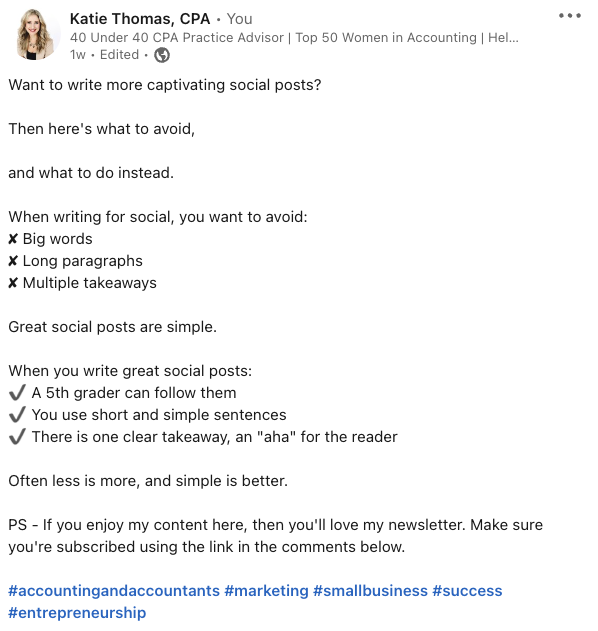
You can see that those first three lines hook the reader. But what else do you notice? I’m being quick, snappy, and to the point.
You want your content to be easy to consume.
- Avoid long blocks of text
- Be conversational
And when I created my video, I took that same approach – short and snappy. You can see that video here if you’re interested.
5. Add the Right Hashtags
Hashtag use is a great way to get your posts noticed. For example, 4.5 million people follow the #accountingandaccountants hashtag on LinkedIn. I thought #accounting would have even more followers, but it’s at just 60k followers.
You need to:
- Do your research on the platform’s hashtag usage and strategies.
- Determine which hashtags have the most followers or popularity.
Adding hashtags can help your posts get seen by more people, expanding your reach and following.
6. Don’t Forget the Call to Action (CTA)
Do you want the viewer to take action?
If you want them to book an appointment, leave a comment, or share their thoughts, you need to ask them.
Be careful though. Hard CTAs, such as “click here to book an appointment,” are not something I recommend using too often because you’ll burn your audience out.
Should you do them at times? Absolutely. Should you do them all the time? Absolutely not.
Often soft calls to action work better to build relationships and aren’t so “in your face.”
For example, you can ask followers to leave comments below your post on:
- Personal stories or anecdotes that relate to your post
- Their opinion or perspective on a specific issue.
- Questions that they have for you
- Etc.
7. Add Links Sparingly
Adding links to your post may sound like a great idea, but your link can cause more harm than good. LinkedIn – or any platform you’re on – wants users to stay on the platform. They don’t want people clicking off to Forbes, YouTube, or any other site.
So when you add a link, your post will often be limited by the platform in its reach.
If you do want to leave a link to maximize reach, create it tactfully by
- Putting “See comment below for a link” in the text of your post
- Adding the link into the first comment below your post
Adding links directly in your post is an option and something I do at times – simply because I want to make it easier for my viewers to click on the link. However, when I do this, I know it’s going to decrease my reach.
8. Be Consistent
So many social accounts fail – or fall short – because people stop showing up. You have to continuously post to your accounts for them to gain traction. Depending on the platform, you may need to post one time per week or up to 5 times per day.
Can’t reach this threshold?
Commit to a certain number of posts and stick to it. Over time, you’ll grow your audience, people will look forward to your posts, and creating content will be easier. Planning ahead will help you remain consistent and build your following.
If you follow the steps above, you’ll be well on your way to crafting the perfect social media post.
And, that’s a wrap on this Dear Katie question.
__
Now I want to hear from you. Do you have a question?
Until next time, cheers to your success!
Katie
